
Welcome
In this issue, we scare up some nightmarish news, terrifying tips, and drag the lake for resources, all to help improve your Digital Teaching, Learning, and Assessment practice. Want to share the spooky spirit with your students? Try out this fun Halloween quiz on Wayground!
Nightmarish News
Launching NEW student AI courses

We are excited to launch our new Using Artificial Intelligence set of small courses for students. They contain guidance on how to use AI effectively, responsibly, and confidently to support college work.
Please promote the courses with your students. They can be accessed from a banner on the Student Dashboard or by going directly to FE LearnZone. We also encourage you to take a look yourself to get up to speed with what your students will be learning.
Auto-enrol closing soon for FE LearnZone

Auto-enrol will be closing after half term, and students will no longer auto-enrol onto FE LearnZone course pages.
If your students do not access your pages before half term, you will need to manually enrol them.
Learn how to enrol and unernol students from LearnZone in our training.
CPD Completion
As a reminder, if you have completed any of our online self‑paced or in‑person training, please fill out the relevant completion form to receive your CPD hours. If you have not completed the training, but can confidently use one of our approved technologies, please complete the Digital Curriculum form.
- If you have completed any of the Digital Essentials training: Digital Essentials CPD Completion Form.
- If you have completed any other online self-paced or in-person training: Digital Curriculum CPD Completion Form.
Terrifying Tips & Rotten Resources
Owl camera case study with Ian Blakemore

We recently had a chance to catch up with Ian Blakemore (Curriculum Head of Sport FE) about his use of the Owl camera in his teaching practice. The case study explores how the Owl camera can be used to enhance group-based learning activities, from student discussions to assessed presentations and collaborative tasks.
Third-party app licences
As we are at the start of the academic year, we wanted to remind everyone of, and introduce new starters to, the third-party apps which we have full licences for.
- Wooclap – An engaging platform designed for teachers to create interactive presentations and activities for their students, including over 20 question types and activities, AI integration, and the ability to add your pre-made presentations. Access our training here.
- Wayground – An easy way to create gamified interactive quizzes and lessons that boost student engagement and check understanding, whether in real time or asynchronously. Its flexible modes and built-in AI tools make it simple to design activities that fit different teaching styles and learner needs. Access our training here.
- Canva – A versatile platform that enables everyone to create visually engaging content such as presentations, infographics, posters, videos, and more. Access our training here.
- Edpuzzle – An interactive online platform designed to help educators enhance the learning experience for students by turning videos into engaging lessons. Access our training here.
These, along with many other popular apps, can be found in our Approved Platforms & Technologies.
If you would like more information or to arrange training on any of these, don’t hesitate to reach out.
Top Tip – Shortcut
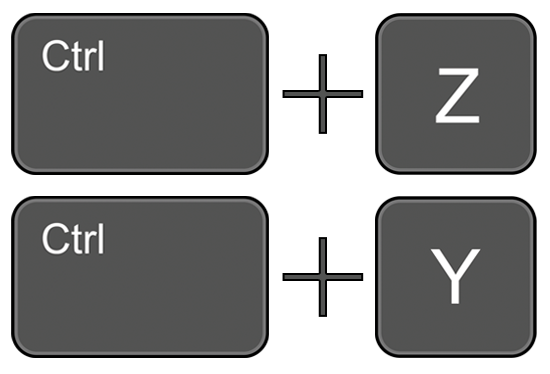
If you hold down the Ctrl key and press Z on your keyboard, you can undo, which reverses your last action. This could be recent typing, deletions, edits, or formatting changes. You can do this multiple times to undo a long string of actions.
Alternatively, holding down Ctrl and pressing Y will redo, which reapplies an action you just undid. These shortcuts work well in Microsoft products, Canva, and other applications.
Help and Support

The Digital Learning team wish you a safe, fun and spooky Halloween!
As always, contact the Digital Learning Team for more information, guidance, and support.
Normalcy will return next month. No tears, please. It’s a waste of good suffering.