

Did you know you can grant students extensions on Turnitin assignments?
There are many situations where a student might need extra time – personal circumstances, accessibility or reasonable adjustments, or even unexpected technical issues.
Turnitin’s Grant Extension feature makes this easy. It lets you give individual students additional time to submit their work without changing the deadline for everyone else. Some of the key benefits include:
- Keeping submission timestamps accurate.
- Avoiding the need to reopen the entire assignment.
- Preventing “late submission” from being incorrectly applied.
- Maintaining the integrity of the originality report timeline.
How to grant an extension in Turnitin
- Navigate to the Turnitin assignment.
- From the Submission list, locate the student you wish to grant an extension to, and select the ellipsis under the More section.

- From the drop-down menu, select Grant extension. The Grant extension pop-up window will then appear.
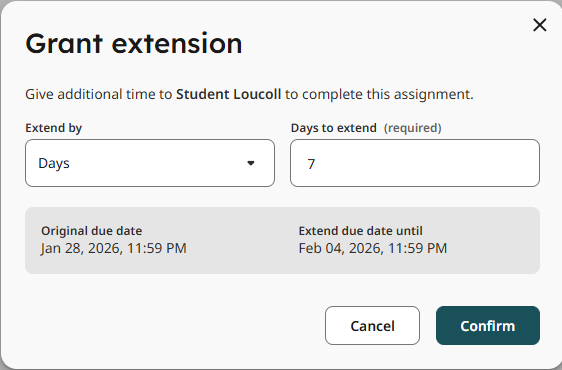
- From the Extend by drop-down, you can select to extend the due date by either hours or days.
- Type in the hours or days you wish to extend the deadline by in the text entry box. Below this, you will see the original due date and the proposed extended due date.
- Select the Confirm button when you are done.
- The extension will then apply to the student.

- The extra hours or days will then appear under the students’ Submitted section in the Submission list.
Help and Support

As always, contact the Digital Learning Team for more information, guidance, and support. You can also book a coaching session here: Digital Learning Coaching.